Grace - Watercolor Floral Clipart: A Practical Asset for Creative Workflows
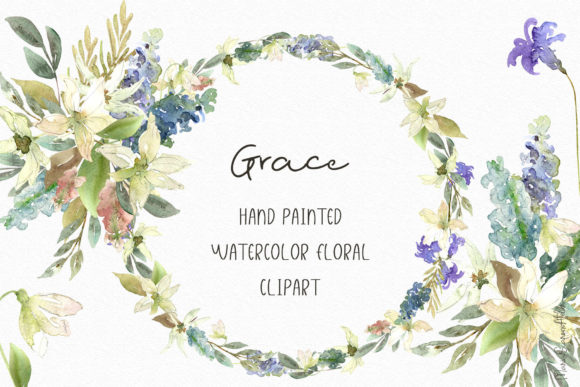
In the realm of digital design, finding high-quality, versatile assets that integrate seamlessly into a project’s workflow is a constant pursuit. Grace - Watercolor Floral Clipart represents not just a collection of beautiful images, but a practical toolkit designed to fit into the planning, execution, and finalization stages of a wide variety of creative and professional tasks. This set of 19 individual illustrations, 5 arrangements, and 3 wreaths, all hand-painted on textured paper and delivered in high-resolution PNG format, is built for integration rather than isolation.
Understanding Its Place in Your Creative Process
Before a project begins, the search for appropriate visual elements can consume significant time. Grace - Watercolor Floral Clipart serves as a foundational graphic resource, removing a key variable early in the planning phase. Its defined palette of soft pastel colors and consistent watercolor style provides immediate direction for mood and aesthetic, allowing you to build other design decisions—like font choice and layout structure—around a stable visual core. This eliminates the common workflow interruption of piecing together disparate graphics from multiple sources, which often results in stylistic clashes and extra editing time.
The collection’s scope, from singular delicate wildflowers to full floral arrangements, means it can be employed at different stages of a project. Early on, a single leaf or flower might be used in a logo sketch or mood board. Later, the completed wreaths or arrangements can serve as final decorative elements for a poster or invitation. Having this range within one cohesive set supports a progressive workflow, where you can move from conceptual mockups to polished finals without switching assets.
Integration with Tools and Platforms
A critical aspect of any digital asset is its practical compatibility. The transparent PNG format of Grace - Watercolor Floral Clipart is a deliberate choice for workflow efficiency. This format allows the graphics to be dragged and dropped directly into common software without the need for complex background removal. Whether you are working in Canva for social media templates, Adobe Illustrator for branding projects, Microsoft Word for stationery, or a web design platform like WordPress, the files are ready to use. The 300 DPI resolution ensures that for print projects like wedding invitations or packaging, the integration is smooth and the output quality remains high, avoiding last-minute adjustments for blurry assets.
Organization is another key intersection point. Professionals managing multiple projects can benefit from treating this clipart set as a unified library. Storing the files in a dedicated "Watercolor Assets" folder alongside your fonts and project templates creates a reusable resource pool. This promotes long-term efficiency; once integrated into your system, these elements can be pulled for future branding updates, seasonal marketing materials, or new product lines, ensuring visual consistency across time.
Specific Use Cases and Workflow Examples
Consider the process of designing wedding invitations. After selecting a color scheme and wording, the graphic element search begins. Instead of sourcing flowers from various artists, you open the Grace - Watercolor Floral Clipart folder. You might place a floral wreath PNG behind the text block in your design software, then use a smaller individual flower to accent the corner of an information card. Because the colors and style are internally consistent, the entire suite of invitation materials—save-the-dates, main invite, thank you cards—feels professionally cohesive without requiring color correction or style matching between each piece.
For a blogger or small business owner creating digital content, these graphics can be integrated into a templated workflow. You might design a series of blog post title images using one of the floral arrangements as a fixed decorative element, only changing the text and background color week-to-week. This turns a creative task into a faster, repeatable process. Similarly, for creating printable PDF planners, the individual leaves and flowers can be used as recurring section icons or monthly dividers, providing a gentle, consistent visual structure throughout the document.
Practical Implementation Tips
To maximize the value of this asset set, a few hands-on observations can guide implementation. First, acknowledge the note about monitor color variation. During your workflow, if precise color matching to a brand hex code is required, briefly place a clipart element next to your brand color in your software and make minor saturation or warmth adjustments. This is a standard step in any professional process when integrating purchased graphics.
Second, leverage the different file types for different purposes. The individual illustrations (0.5x7 to 1x2.6 inches) are your flexible components for building custom compositions. Use them like stamps to create unique borders or patterns on fabric designs or decorative papers. The pre-made arrangements and wreaths, however, are your efficiency tools. When time is limited, these are ready-to-go focal points that can be placed, resized, and used immediately in posters, greeting cards, or website banners.
Finally, think beyond the obvious applications. While invitations and cards are natural fits, consider integration into less traditional workflows. The high-resolution detail makes these flowers suitable for subtle texture overlays on website backgrounds or as delicate patterns on product mockup photos. A freelancer creating client presentation templates might use a small, faded flower in the corner of every slide master to add a unified, soft branding touch.
Quality Control and Long-Term Utility
From a workflow perspective, consistent quality is a safeguard against project delays. Because all pieces in Grace - Watercolor Floral Clipart were hand-painted on the same textured paper and digitized at the same 300 DPI specification, you avoid the risk of one graphic appearing sharper or more stylistically divergent than another. This built-in quality control allows you to focus on composition and layout rather than fixing asset inconsistencies.
For long-term use, treat this collection as a core brand asset if its style aligns with your identity. A small business owner in the wellness or wedding sector might adopt these flowers as a permanent part of their visual language. By doing so, every new product launch, social media campaign, or packaging update can begin with this trusted graphic set, drastically shortening the creative initiation phase and building recognizable visual continuity with customers over time.
Streamlining Your Creative Execution
The ultimate value of a well-curated clipart collection lies in its ability to turn creative vision into executed work with fewer obstacles. Grace - Watercolor Floral Clipart, with its specific parameters and thoughtful composition, is designed for that transition. It interacts with your workflow by providing a reliable, high-quality starting point that is compatible with common tools, scalable for different project stages, and versatile enough for both digital and print outcomes. By integrating it as a planned resource within your creative or business process, you replace repeated searches for graphics with a simple, effective step: opening a folder and selecting the right element for the task at hand.
Its application spans the workflow from the initial planning of a project’s look and feel, through the active design phase where elements are combined with text and other graphics, to the final quality check where consistency is verified. For the professional, marketer, or hobbyist, this represents a practical investment not just in beauty, but in process efficiency. The delicate wildflowers immortalized from a garden become, in practice, durable tools for immortalizing your own creative ideas.